Transformations that know their context
dlthub ships 2 ways to run transformations - you can bring your own dbt project or use dlthub native transformations. This posts aims to explain to practitioners and technical decision makers how the two methods are different. Let’s dive in!

Adrian Brudaru
Co-Founder & CDO
8 min read
On this page
The evolution of the data dev harness
Before tools like dbt, data stacks were on a spectrum between some rules, no rules or DIY sql orchestrators enforcing rules. dbt released the first open source orchestrator for SQL, making it the first SQL orchestrator you could get online for free and run in your classic data projects.
dbt is a harness for humans, and that's it’s so popular. It took "person who knows SQL" and wrapped them in project structure, tests, and software operations. But a harness for humans is capped by what a human can hold. You can teach a junior the folder layout and the style guide; you can't hand them the understanding of the whole architecture on day one.
dltHub transformations are a harness for agents. Agents can carry meaning, not only structure.
An agent reads it all: the architecture, docs, the style guide, the live schemas, the lineage, the change history. Tribal knowledge moves out of heads and into the stack, and architecture becomes cleaner because the agent can provide architectural guardrails that previously would require a competent architect for.
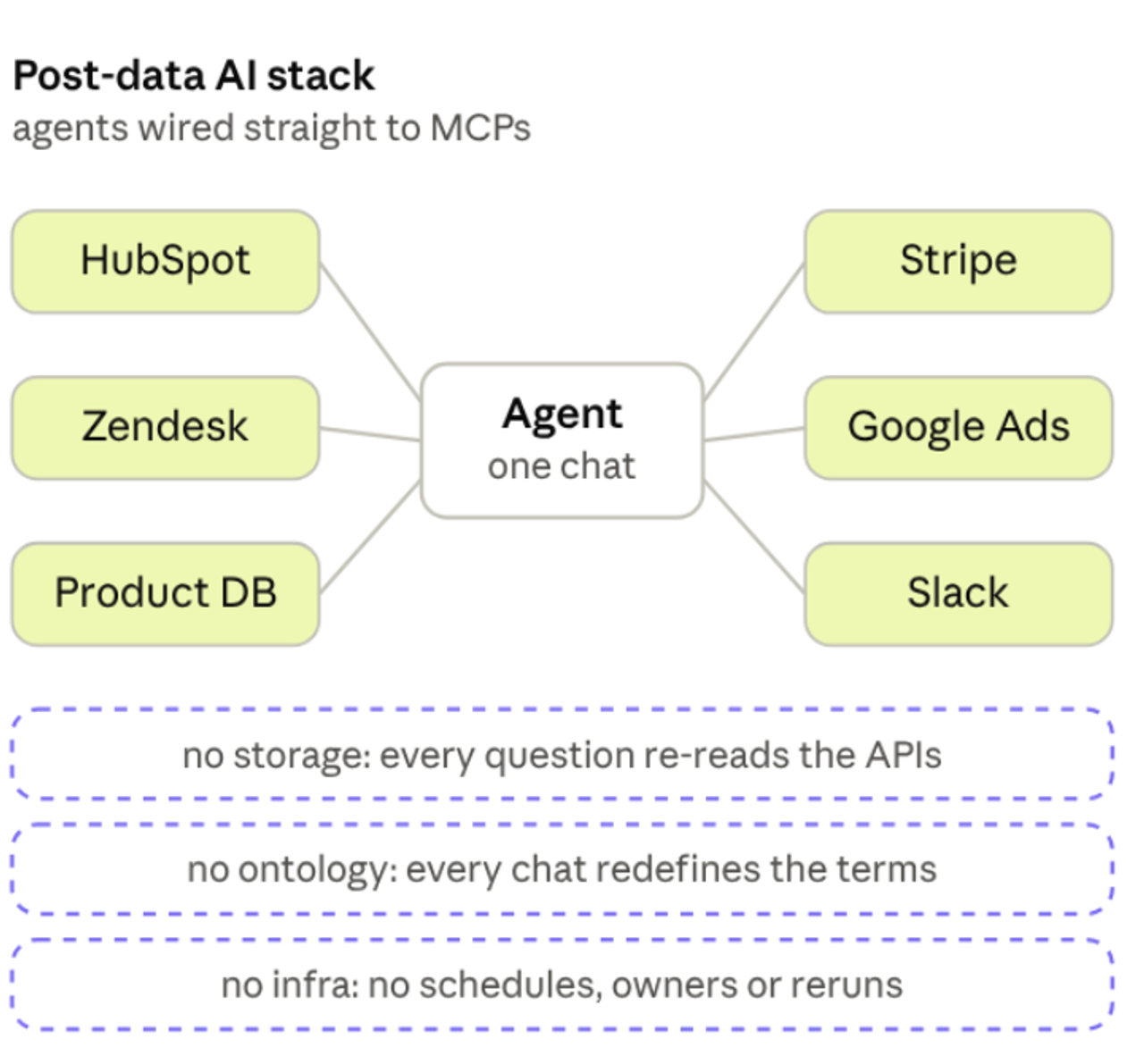
The distinctions aren't only operational. Pre-agent tooling optimized for a human reader, and those optimizations now cut backwards: macro indirection saves a human typing and costs the machine the ability to see the executed SQL; error verbosity that humans skim is exactly what agents debug from; metadata rendered as pages for eyes rather than records for machines.
Transformations on dltHub: one place for the meaning, two ways to run them
Most transformation tools are organised around a central project. The central data warehouse, the core team. That was fine a decade ago, when the main goal of a data team was to report upwards.
But to make change on those metrics, the operational teams also need the data, on a bigger level of detail.
That gives rise to domain-specific needs that have to be served in decentralized ways to remove bottlenecks: embedded analysts, data mesh, data scientists running their own transforms outside the central project.
dltHub provides a native transformation framework aimed at flexible usage across all of those collaboration patterns: mixed teams, central teams, decentralized and data mesh teams, end-to-end teams, AI-native teams. It acts as an AI harness, enabling non senior team members to operate like senior engineers.
It also provides two ways to run dbt, for centralized teams that already run dbt. Let's dig into the two ways to do transformations:
- Method 1: dltHub transformations, natively
- Method 2: dbt, run from dltHub, either as a dbt Core job or as a dbt Cloud job triggered after ingestion
Method 1: Run dltHub transformations natively
Transformations run in the same runtime as the ingestion that produced the data. One repo, one set of credentials, one metadata graph from source to mart, one place to schedule. As effect:
- The maintenance tax drops. dlthub’s agent can compare local code schema to online schemas to self correct during development, preventing breaking schema changes from being deployed to production, practically removing the largest reason of maintenance events.
- Teams can own their own step. dlthub transformations use ibis to disconnect code dialect from runtime. This makes the code portable between decentralized teams and core. This independence enables both productivity and portability between teams. Whether you have local duckdb users developing for the central snowflake team, or ML teams post processing with python and arrow, it’s all possible in one interface. Composable canonical or data mesh architectures become native.
- Context sits in one place, so agents are competent. The runtime is full of metadata for agents: schemas, lineage, annotations, run state. A column marked PII at ingestion is also marked downstream in transformations. The canonical modeling agent documents your business model ontology so anyone working later has all the necessary business context already documented. Knowledge that used to leave with the analyst becomes a versioned file.
The seams where context usually leaks (a handoff from the EL tool to the transformation tool, a second credential store, a second scheduler) aren't there to leak across. I've written that architecture up in more depth in One runtime, one agentic context and What is the dltHub Context Layer.
How it works
One decorator. @dlt.hub.transformation has the same signature as @dlt.resource, except the function yields a query instead of rows:
py
@dlt.hub.transformation(name="orders_per_user", write_disposition="merge")
def orders_per_user(dataset: dlt.Dataset):
    purchases = dataset.table("purchases").to_ibis()
    yield purchases.group_by(purchases.customer_id).aggregate(
        order_count=purchases.id.count()
    )
Supports Ibis, raw SQL, or pandas/Polars/Arrow.
Where it executes?
- if source and destination are the same, dlt compiles the query and runs it there, no rows through your machine;
- if source and destination of a transformation are different locations, dlthub it extracts the result and fast syncs it to the destination location.
Your business definitions become reviewable code
As showcased in the Navit case study, tribal knowledge can be captured into an ontology which is then used for development and data analysis.
This helps arrange your data in an agent native virtual knowledge graph, which is both a classic, canonical architecture and a modern context engineering necessity.
This not only reduces organisational knowledge loss risk, but also increases coherence and efficiency of the data model. You can read in detail why in Text-to-SQL is a definition problem and Composable canonicals.
How dltHub handles scheduling
Scheduling (docs) is done via a decorator:
from dlt.hub import run
from dlt.hub.run import trigger

@run.pipeline("crm_ingest", trigger=trigger.schedule("0 3 * * *"))
def load_crm():
    ...

@run.job(trigger=load_crm.success)
def build_model():
    ...
Every decorated job exposes .success, .fail, and .completed, so the dependency graph is just Python references. Follow-ups fire the moment upstream finishes, with no polling and no scheduler delay.
If you'd rather keep a downstream job on its own clock but never let it read a half-loaded table, you can use freshness=[load_crm.is_fresh] instead, which skips the run while upstream is mid-load.
There's also an interval running pattern, which hands each run the [start, end) window, which can also be used for various backfilling patterns.
One more neat thing: less infra to worry about: Just pick runner size in the scheduler. While by default transformations get delegated to your runtime (like snowflake), this enables you to better manage combined transformation patterns such as using a duckdb engine to transform over files or python native operations.
You can read more in the scheduler docs.
Method 2: Run dbt from dltHub
A lot of teams have a dbt project that works, that analysts know, and that nobody sensible wants to rewrite as a condition of changing their ingestion tool. You don't have to. The models stay where they are, and dltHub runs them once the load lands, either by executing dbt Core itself or by triggering the dbt Cloud job you already have.
Here’s how you run a dbt core project after the ingestion succeeds:
@run.job(trigger=load_crm.success, require={"dependency_groups": ["dbt"]})
def run_dbt_models():
    # carries the destination, the credentials and the dataset dbt builds into
    target = dlt.pipeline("crm", destination="snowflake", dataset_name="crm_analytics")
    dlt.dbt.package(target, "dbt/crm").run_all()
The dbt profile is generated from that pipeline. The destination picks the profile type, credentials pass through as environment variables, and dataset_name becomes the schema dbt builds into, so there's no profiles.yml to maintain and no second place to rotate warehouse credentials.
The rest is configuration: dbt runner options and per-job timeouts, dependency groups and instance sizing.
If your models already run on dbt Cloud, which is where most teams with a mature project are, you keep them there and just move the trigger:
from dlt.helpers.dbt_cloud import run_dbt_cloud_job

@run.job(trigger=load_crm.success)
def run_models():
    run_dbt_cloud_job(job_id=1234, wait_for_outcome=True)
Either route gives you three things:
- One less orchestrator. The dependency between "data landed" and "models run" lives in the same repo as both, expressed as a Python reference.
- Models don't run on failed ingestion.
load_crm.successmeans what it says. No more transforming yesterday's data and shipping it to a dashboard as if it were today's. - No race conditions. The status quo is "dlt starts at 4am, usually takes 30 minutes, I'll schedule dbt at 4:50 to be safe." It's a guess that gets re-guessed every time the source grows, and loses whenever a load runs long. Event-based triggering removes the race instead of padding it.
Where to start
Are you a builder? Try it now: tell your agent “Run uvx dlthub-start@latest to build my first pipeline and run it on dltHub”. 30h runtime included for 2 weeks, no credit card required.
Are you a decision maker? Any engineer on your team can ship production data, with agents doing the work on infra we run. Every run is logged and auditable. Book a demo or Explore Blueprints