From raw data to a trusted ClickHouse Agent answer: dltHub on ClickHouse technical walkthrough
Today, we're announcing the Private Preview of the dltHub Ontology for ClickHouse Cloud and ClickHouse Agents. This blog post provides the technical walkthrough of the private preview. Learn how to load data definitions alongside with ontologies and business context into ClickHouse, allowing ClickHouse Agent to give reliable answers.

Thierry Jean
Senior AI Engineer
5 min read
On this page
- Without definitions written by people, an agent can't give answers you can trust
- Demo: how much GitHub CI goes to waste?
- 1. Without dltHub: ClickHouse Agent can't find any definition
- 2. Context on load: dltHub adds data descriptions directly to ClickHouse
- 3. A scheduled dltHub pipeline loads the data and its definitions into ClickHouse
- 4. dltHub keeps the business context in the ontologies
- 5. With dltHub: ClickHouse Agent uses governed definitions and produces reusable analytics
- Business definition defined once, reused by every tool
- Try it for yourself
Without definitions written by people, an agent can't give answers you can trust
“How do I let people and agents reach any data they need, and still get trusted answers?”
This is a key challenge our customers are facing, and it's only getting harder with the growing adoption of LLMs and agents.
Last month, dlt users and agents loaded data from 53,623 sources for AI agents, RAG pipelines, and web scraping. That is 3x more than last month. Each source adds concepts to define: what a field means, what counts as a metric, which table to trust.
And companies' knowledge sprawls across tools and systems: a Jira ticket, a Notion page, a markdown file in the repo, a semantic layer, a gold layer of modeled tables, or the memory of an employee.
The definition exists, but agents can't reliably find it. This post shows how dltHub can solve this problem on ClickHouse.
Demo: how much GitHub CI goes to waste?
To showcase how dltHub works, we'll try to answer the question: "How much CI compute was wasted in the last 30 days?" for the dlt repository on GitHub. The full experience is driven by Claude Code (or your favorite agent harness) equipped with the dltHub AI Harness.
1. Without dltHub: ClickHouse Agent can't find any definition
Before we start, let's look at what happens when you have GitHub data in ClickHouse, but no additional context: table and column names that don't map to your company language, no table- or column-level comments, etc. When asked about CI waste, the ClickHouse Agent can't find a definition, so it invents one and writes SQL for it. After the session, the definition is gone, and the next answer may use a different one. ▶ Watch at 0:21
2. Context on load: dltHub adds data descriptions directly to ClickHouse
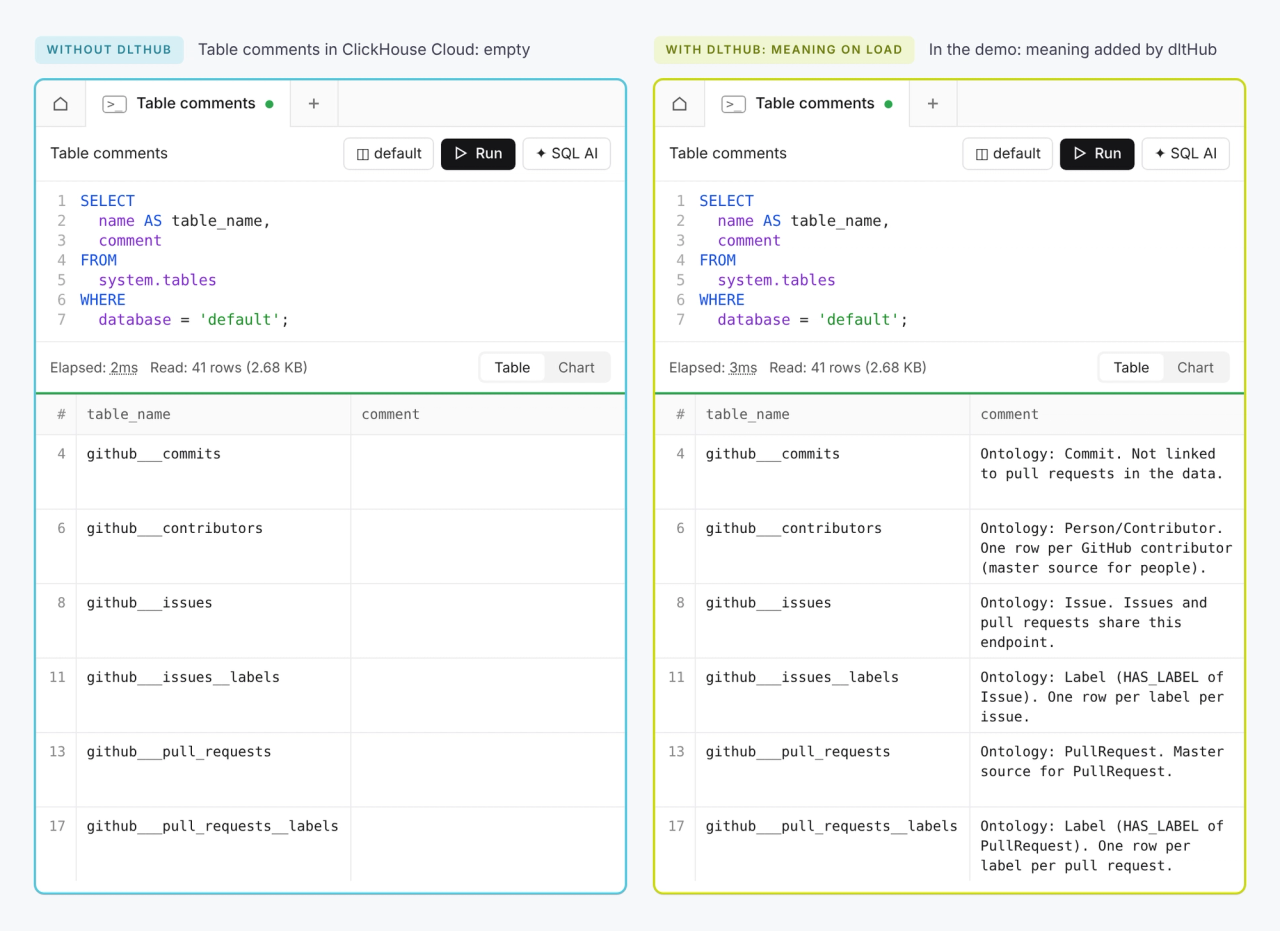
Business definitions are usually scattered or missing. dltHub puts them where every ClickHouse tool already looks: in the ClickHouse table and column comments. ▶ Watch at 0:45
3. A scheduled dltHub pipeline loads the data and its definitions into ClickHouse
With the dltHub AI Harness, Claude can create a pipeline from scratch in 5 minutes. The agent asks the right questions to configure your pipeline, runs small workloads locally, and guides you to get the credentials for the service. Once you have a working pipeline, the agent can deploy it to dltHub, schedule it, and run it to load data into ClickHouse Cloud. As the data loads, it adds a comment to every table and column describing what it holds. ▶ Watch at 2:33
4. dltHub keeps the business context in the ontologies
Your business definitions should drive your data modelling, not the other way around. That's why dltHub starts by interactively defining an ontology: what does your business mean by “CI waste”? This ontology can be versioned with your code in git and deployed with your pipeline code to dltHub, since ClickHouse doesn’t have a dedicated place for these artifacts. Because the ontology exists detached from your tables, it can help you answer analytics questions, deal with a broken schema, or track down a bug. ▶ Watch at 4:51
We tell the agent what waste means: jobs that were superseded, canceled, or timed out. The agent writes this into an ontology file in the repo.
After building the ontology, the dltHub AI Harness designs a canonical data model (CDM) to reshape the data to answer our question about CI waste. This data model is easy to review with diagramming tools.
After the data model is approved, the dltHub AI Harness authors the data transformations (think SQL queries) and tests them individually against ClickHouse. Then, it deploys the transformation job to dltHub and launches it, and ClickHouse computes the new analytics tables. ▶ Watch at 5:21
5. With dltHub: ClickHouse Agent uses governed definitions and produces reusable analytics
We ask the ClickHouse Agent the same question again. It reads the comments, finds the new tables and answers from the definition we wrote. Every time we ask, the answer comes from that definition, and every number traces back to it. Having the ontology and CDM also means the data is ready for follow-up questions that require filters, group by, aggregates, drill-downs without blowing up your warehouse costs. ▶ Watch at 2:19
Business definition defined once, reused by every tool
We defined CI waste once, in the ontology, next to our pipeline, and it allowed us to annotate all of our data in ClickHouse. A colleague, their agent, or any tool pointed to ClickHouse gets the same answer you do.
Try it for yourself
dltHub has joined House Mates, ClickHouse’s official partnership program, and today we’re announcing the Private Preview of the dltHub Ontology for ClickHouse Cloud and ClickHouse Agents.
Loading data into ClickHouse with the dltHub AI Harness works today. Writing the meaning into ClickHouse is part of dltHub and is available as a Private Preview: get early access through our team. Contact us if you run ClickHouse and want trusted agent answers on your own data.
One thing we're not claiming yet: the comments are written on each pipeline run, not the moment a schema changes.
The same idea on Databricks:
dltHub brings the data and its meaning. ClickHouse Agent answers.