New data in Snowflake without a new approval path: dltHub on Snowpark Container Services
dltHub on Snowpark Container Services is now in Private Preview. Load new data into Snowflake from any REST API, SQL database or file, with pipelines that run in your own account, on your compute and under your roles. There is no new approval path, and at the Snowflake-only level nothing leaves your account.

Matthaus Krzykowski
Co-Founder & CEO
4 min read
We are opening a Private Preview of dltHub on Snowpark Container Services. You will be able to buy dltHub on Snowpark Container Services through Snowflake against your existing Snowflake commitment and install it as a Snowflake Native App from the Snowflake Marketplace.
dltHub on Snowpark will allow you to load new data into Snowflake from any REST API, SQL database or file, with pipelines built from a plain-English request or written by you in Python you own. Your dlt pipelines run in your own Snowflake account, on your compute and under your roles, so there is no new approval path, and at the Snowflake-only level, nothing leaves your account.
The question we keep hearing
How do we get a new data source into Snowflake this sprint, when every new tool needs a security review? Teams in finance and health tell us Snowflake is where their data, access rules and audit trail already are, and they want as little as possible to happen outside it. A new ingestion platform means a POC, a security review and procurement before the first table loads. Building on Snowpark yourself means your engineers build the platform first.
What you can load
dltHub's AI toolkits build three kinds of pipelines from a plain-English request, and you can also write them in code yourself:
- REST APIs. Shopify orders and returns, ad platforms like Meta, TikTok and Google Ads, ERP and billing systems like NetSuite, or an internal API no vendor covers.
- SQL databases. Tables from the databases behind your applications, such as Postgres, Oracle or SQL Server, including replication of inserts, updates and deletes.
- Files. CSV, JSON and Excel files, including the ones that sit in SharePoint.
These connectors work out of the box for you and your agent, and they stay fully customizable. The Python code is yours, so you can add an endpoint or fix something today instead of waiting on a vendor roadmap.
What you can run on dltHub
Everything your team, or its coding agent, writes to bring new data into Snowflake: the REST API, SQL database and file pipelines above, plus the jobs that follow a load, such as a data-quality check. Each one runs as a Snowflake task, on a schedule or triggered by event.
Here is what that gets you:
- New data this sprint, not next quarter. Your security team reviews Snowflake roles, Secrets and compute that it already governs. It does not review a new external platform. Procurement sees the contract it already has: dltHub is billed through the Snowflake Marketplace, and eligible customers pay with credits they have already committed.
- Engineers write pipelines, not a platform. The Python is yours. The packaging, deployment and upkeep that a home-built setup on Snowpark would need are ours, so those two or three engineers go back to loading data.
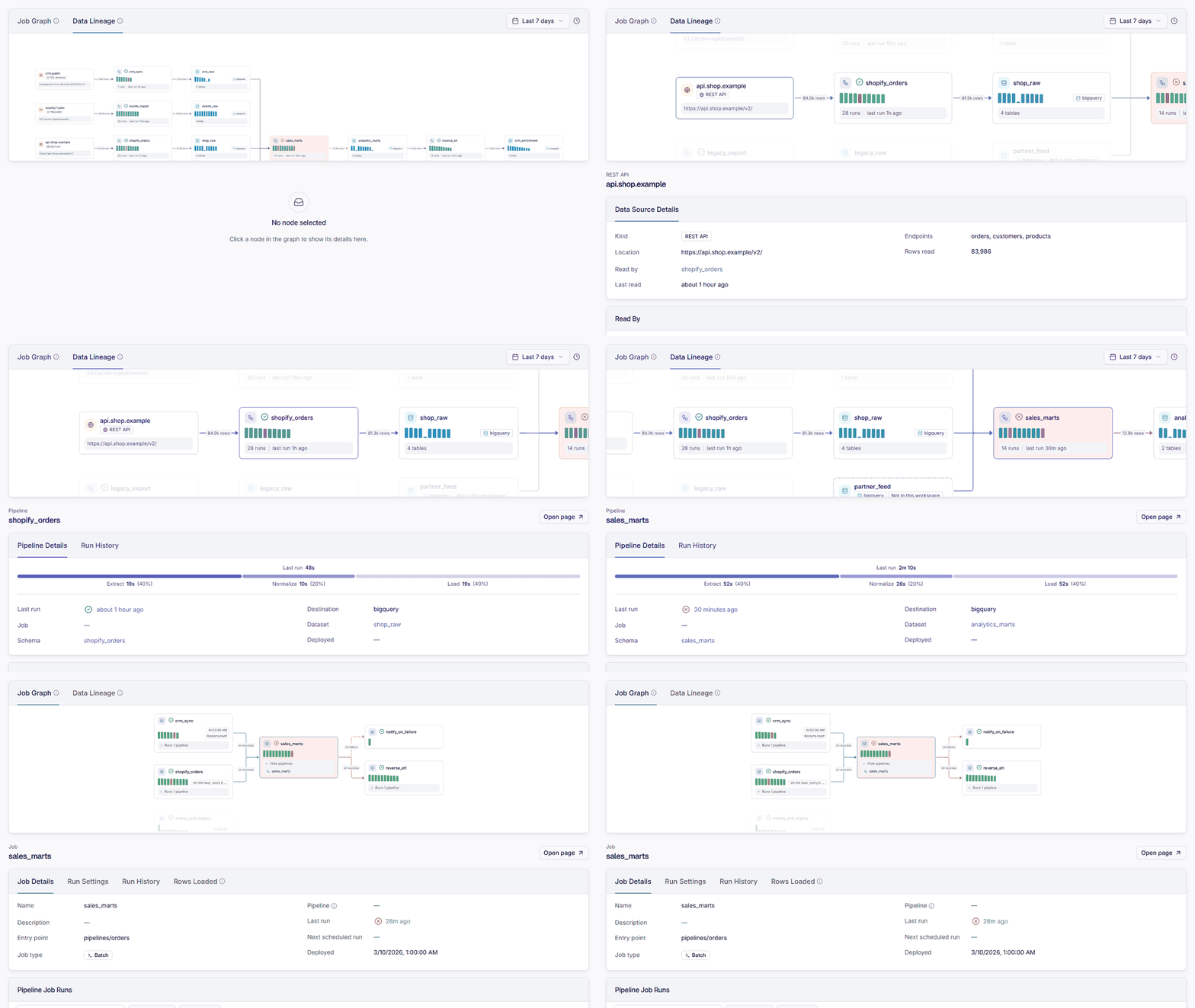
- One audit trail. Every run, successful or not, sits in Snowsight next to the rest of your account's activity. Auditors check one place.
An agent can write a pipeline in minutes. dltHub is where it runs, inside the account you have already approved.
What changes
You install dltHub from the Snowflake Marketplace into your account. After that, the work you would otherwise do yourself moves to us:
| Build it yourself with dlt | With dltHub in Snowflake | |
|---|---|---|
| Deploying | Package and push a container image for every change | One deploy. Unchanged code isn't rebuilt |
| Scheduling | Write the code that starts each pipeline on Snowpark | Every job runs as a Snowflake task, out of the box |
| Run results | Read back success, failure and logs after every run | Every run recorded in Snowsight with its result and last log lines |
| Infrastructure management | Provision compute pools, containers and tasks, and build your own orchestration to tie them together | Compute, tasks and orchestration set up and run for you inside your Snowflake account |
| Secrets | Wire secrets into the containers | Source credentials in Snowflake Secrets |
| Maintenance | An internal team owns the platform: upgrades, failed deploys, scaling, on-call | dltHub maintains the runtime. Your team works on pipelines, not the platform |
A pipeline can only reach the endpoints you allow.
You decide what leaves your account, and when
No two companies have the same rules, so dltHub doesn't force one model on you. You start fully isolated and share more only when your governance allows it. At every level, pipelines run in Snowpark Container Services and your data stays in your tables. What changes is how much metadata, code or access you share with dltHub, and what that unlocks. Level 4 is the one level where jobs also run on dltHub compute.
| Level | What leaves Snowflake | What you get |
|---|---|---|
| Isolated: Snowflake only | Nothing. Data, code, secrets and logs stay in your account | Scheduled and chained jobs, explicit job refresh, full run history in Snowsight |
| Level 1: Control plane | Jobs, triggers, schedules and run status. No data or code | Interval-based runs, freshness triggers, email and Slack alerts, job dependency view |
| Level 2: Observability | Pipeline traces (steps, timings, row counts, errors, no rows of data), optionally the runner's service logs. Stored in the EU or US | Pipeline and dataset observability, lineage and schema views, log views |
| Level 3: Agentic context | Workspace code, configs and agent skills | Sandboxed background agents with no data access, for example for schema drift and fixing failed runs. Ontologies and data mesh links |
| Level 4: Dual deployment | Selected data access, such as read-only, and selected secrets | Jobs on Snowflake and dltHub compute in one workspace, data apps, workspace MCP |
Many regulated teams will start at the isolated level and may never need more. Moving up is your call, and you can do it for one team or one use case at a time.
Starting today, the isolated deployment option is available in Private Preview, with the other options available in general availability by January 2027.
Three things hold at every level:
| What it means | |
|---|---|
| Compute | Pipelines run in Snowpark Container Services, on a compute pool in your account. |
| Billing | dltHub bills through the Snowflake Marketplace. Eligible Snowflake customers can use their credits to pay. |
| Account link | When your Snowflake admin installs the dltHub app from Snowflake Marketplace, your Snowflake account is automatically linked to your dltHub organization. |
What is available now
The Private Preview starts at the isolated level. Further levels follow as the preview opens to more customers.
What does it cost?
We charge a fixed annual license fee for dltHub on Snowpark. The fee depends on your required support level and anticipated usage.
Get access
Contact dltHub sales to join the private preview and get hands-on onboarding from our engineers, configured around your stack and use case.
By the end of the year, dltHub on Snowpark Container Services will be available on the Snowflake Marketplace, with a self-serve trial you can start with a few clicks directly from your Snowflake account.