Credit usage notifications
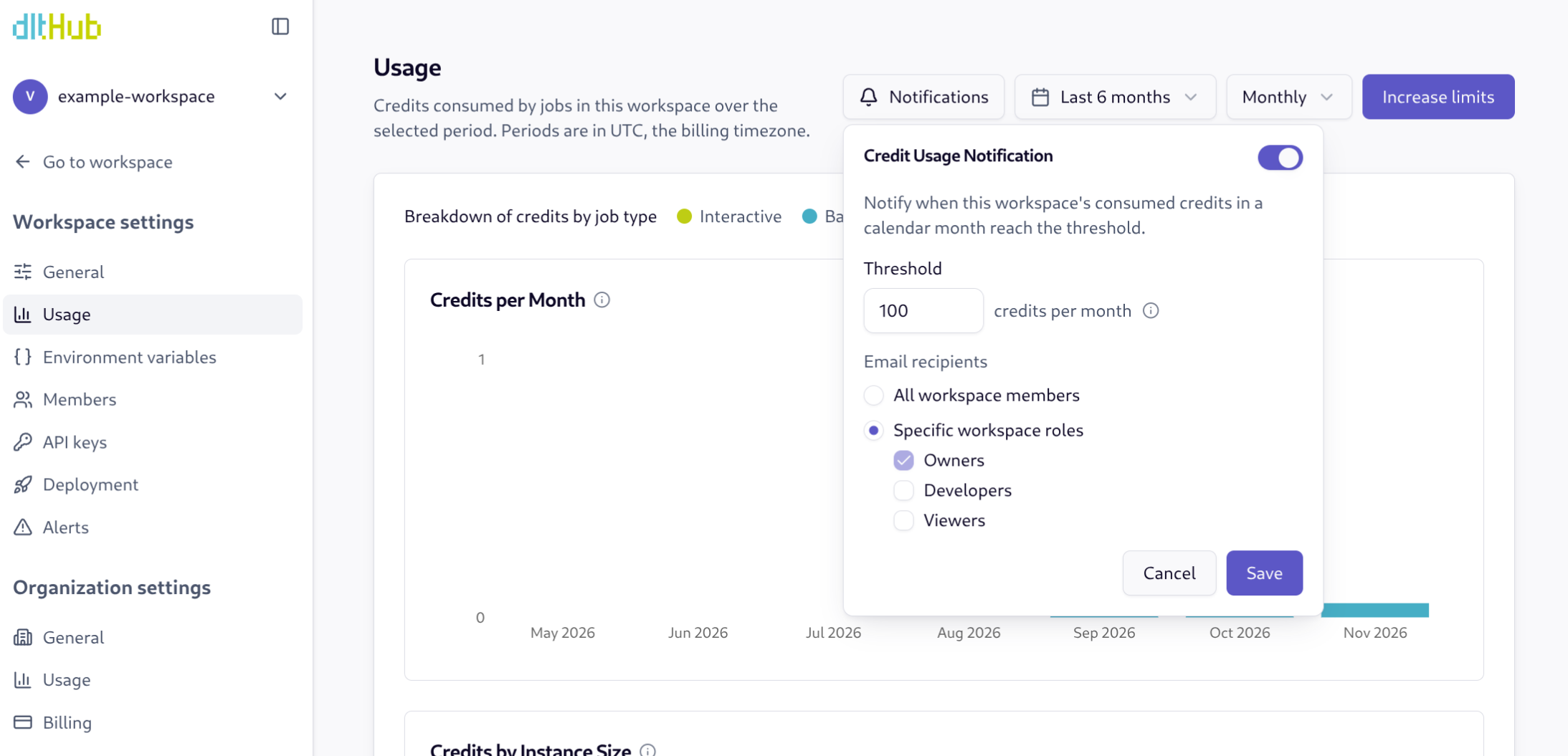
dltHub emails you when credit usage for the month reaches a threshold you set on the Usage page. Set one on a workspace to watch jobs in that workspace, or on the organization to watch every workspace. Each has its own threshold and its own recipients, and stays off until you enable it.
Job-run notifications are configured separately under Settings > Alerts. See Send email notifications and Send Slack notifications.
How to configure
- Open the dltHub Web UI (app.dlthub.com) and go to the Usage page you want to monitor:
- Workspace: Settings > Usage (
/w/<workspace_id>/settings/usage). - Organization: organization Settings > Usage (
/w/<workspace_id>/settings/org/usage).
-
In the usage toolbar, click Notifications.
-
In the Credit Usage Notification popover, toggle Enable credit usage notification on.
-
Under Threshold, enter a whole number of credits for the month, 1 or more.
-
Under Email recipients, select who should receive the email:
- Workspace: All workspace members, or Specific workspace roles (Owners, Developers, Viewers).
- Organization: All organization members, or Specific organization roles (Owners, Members).
Recipients are members of the workspace or organization.
- Click Save.
To turn the notification off, toggle the switch off and click Save.
A workspace owner or an organization owner can change the workspace notification. Only an organization owner can open organization usage or change the organization notification. Other roles can open the workspace popover and see the current settings. On an archived workspace, the notification stays as it is.
What the email includes
dltHub sends one email when usage for the current calendar month (UTC) crosses the threshold. Credits count when a job run finishes. If you raise the threshold and usage later crosses the new value, dltHub sends another email. A workspace notification and an organization notification are sent separately.
Each email includes:
- The workspace or organization name.
- The calendar month.
- Credits consumed and the threshold that was crossed.
- The UTC time the threshold was reached.
- A link back to the Usage page.